Python: Session 1
University Libraries at the University of North Carolina at Chapel Hill
Goals:
- Learn to work with basic Python data types and objects
- Introduce Loops and Conditionals
Why Python?
What is a programming language?
Programming languages allow one to write instructions in human-readable form that can then be read and understood by a computer. "High level" languages like Python translate sets of commands or instructions (programs) created by people (programmers) to "low level" languages more readily understood by the computer. Once these instructions have been translated the computer can then follow the steps within to perform a specific task. (For more information on high- and low-level languages, please see this definition.)
Python is a general-purpose programming language that has become popular for data and text analysis. Python can be easier to learn than other languages because it emphasizes (human) readability and flexibility. Python is the second most used language on GitHub; this means you'll find packages (sets of functionality developed by other users) to use Python for a wide variety of problems and tasks.
If you haven't worked with a programming language before, learning Python will introduce you to methods used in many programming languages, making it easier to learn other languages like Java and R later on.
Python in the age of AI
Programming helps develop computational thinking: breaking problems into steps, recognizing patterns, testing assumptions, and communicating clearly. These skills support work with data, research, automation, and digital tools—even when programming is not your primary focus.
In the age of AI, basic Python knowledge helps you evaluate, adapt, troubleshoot, and take responsibility for AI-generated code. You do not need to write everything from scratch; you need enough understanding to ask better questions, identify errors, protect data, and determine whether the results are trustworthy.
Use Cases
Scripting
Writing code to automate repeptitive tasks. For example, you might need to extract text from thousands of pdf files and sort them into directories based on whether the texts mention particular phrases. To do this, you would need to create instructions for how to find the pdfs (and skip any non-pdfs!), open them, extract text, search for the key terms, then move the file to the proper final location. In this series, we'll learn about some of the fundamental building blocks for translating a such processes into instructions the computer can understand. The other uses outlined below often involve some element of automation!
Natural Language Processing
The
NLTKpackage provides tools for dealing with unstructured text such as parsing words and sentences, or tagging parts of speech.tesseractapplies optical character recognition (OCR) to transform images into machine readable text. Other packages provide access to algorithms like topic modeling on text corpora. Scripting to automate these steps is necessary to apply these algorithms to the vast corpora common in NLP (for example, Early English Books Online provides access to 130,000 works produced in English from 1473-1700).
Data Science
Python has a well-developed ecosystem of specialized tools and functions for everything from fitting deep learning models with
tensorflowto creating visualizations withseaborn. Most of these tasks aren't directly covered in Python's standard functionality (our focus today). Later on, we'll explore some of the foundational packages used for Data Science in Python: the SciPy ecosystem, especiallypandas.
Others
There are also packages available in Python for web development (
Django), image processing (pillow), web scraping (BeautifulSoup), APIs, databases, games (pygame), psychological experiments (PsychoPy), astronomy (astropy), and many many other uses.
Jupyter Notebooks are a popular tool to share python code in a "literate" format, mixing regular english with code and outputs, including formatted tables, visualizations, etc., for easy comprehension by non-Python users. We'll explore Jupyter Notebooks later on in this series of workshops.
However, there are few things you can do in Python that can't also be done in other languages! If you already know one or more programming language, you'll have to decide where Python best fits in your own workflows.
Python vs. R
R is another popular language often compared to Python in the realm of data science. Each has relative strengths and weaknesses, but in most cases Python and R can ultimately accomplish the same goals. We also teach a series of workshops introducing the R language: beginR, however we usually recommend that you focus on one language at a time to avoid confusion!
Warning!
If you're already comfortable with basic programming concepts, you'll probably find this workshop very straightforward. The later workshops in the series may be more helpful if you're already familiar with the concepts below and just need to learn new syntax. Experienced attendees are more than welcome to stay, review, and help others!
Getting Started
IDEs
An Integrated Development Environment (IDE) is software that combines many tools to help you use a programming language, such as a code editor, compiler, and debugger in a convenient interface. There are many different IDEs to choose from. IDEs are not necessary, but are often good for beginners and useful for experienced users.
As you gain experience, you can choose whether an IDE is right for your uses and which one works best for you. For the purposes of this workshop, we will use VS Code. Click here to download and install VS Code.
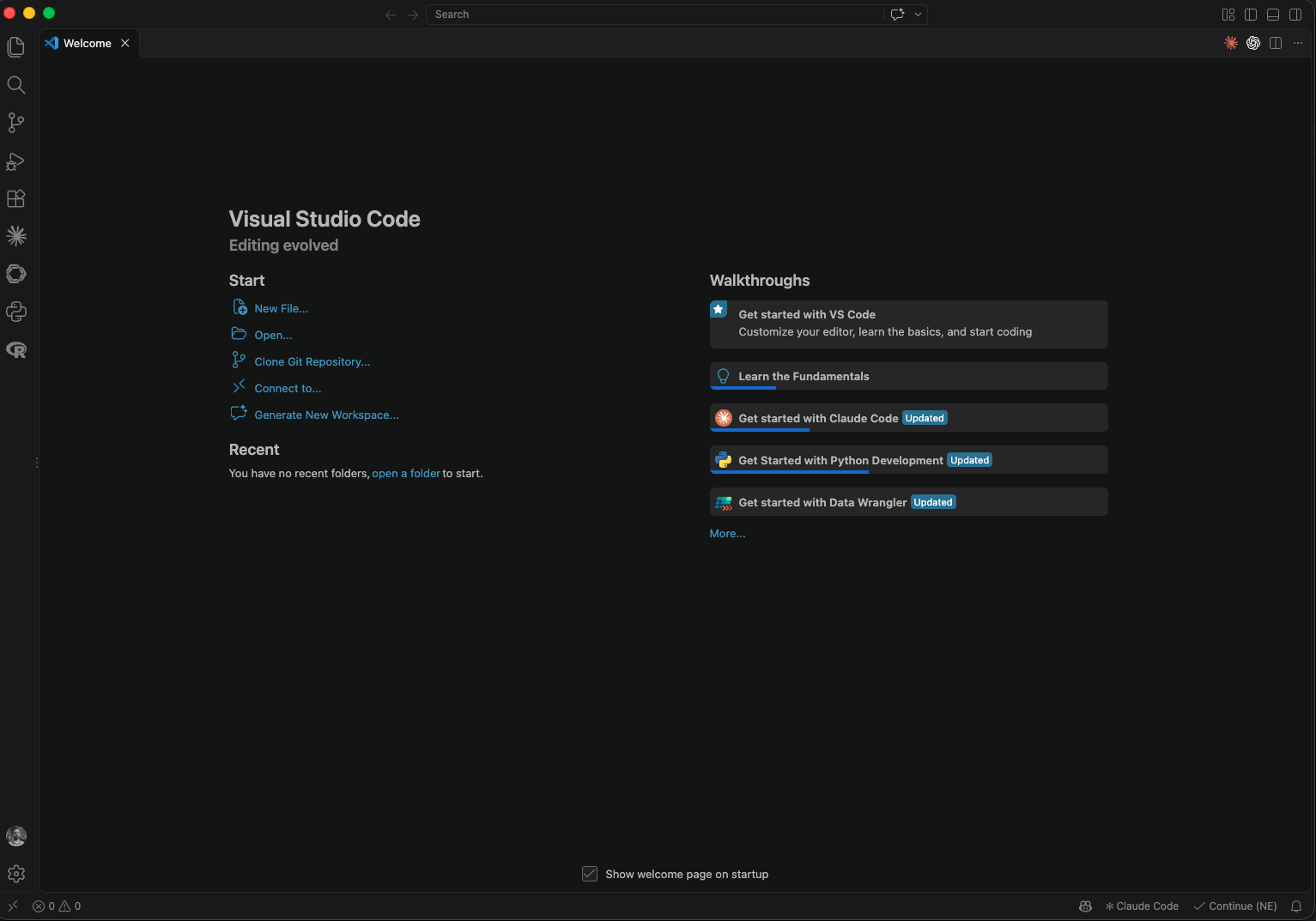
Open VS Code:
- Windows: Start > Search VS Code
- Mac: Spotlight Search (Cmd+S) > Search VS Code
Create project folder
- Use Finder (Mac) or File Explorer (PC) to create a folder for the workshop called “python_workshop” on your desktop.
- Open VS Code and click File > Open Folder and navigate to the folder you created.
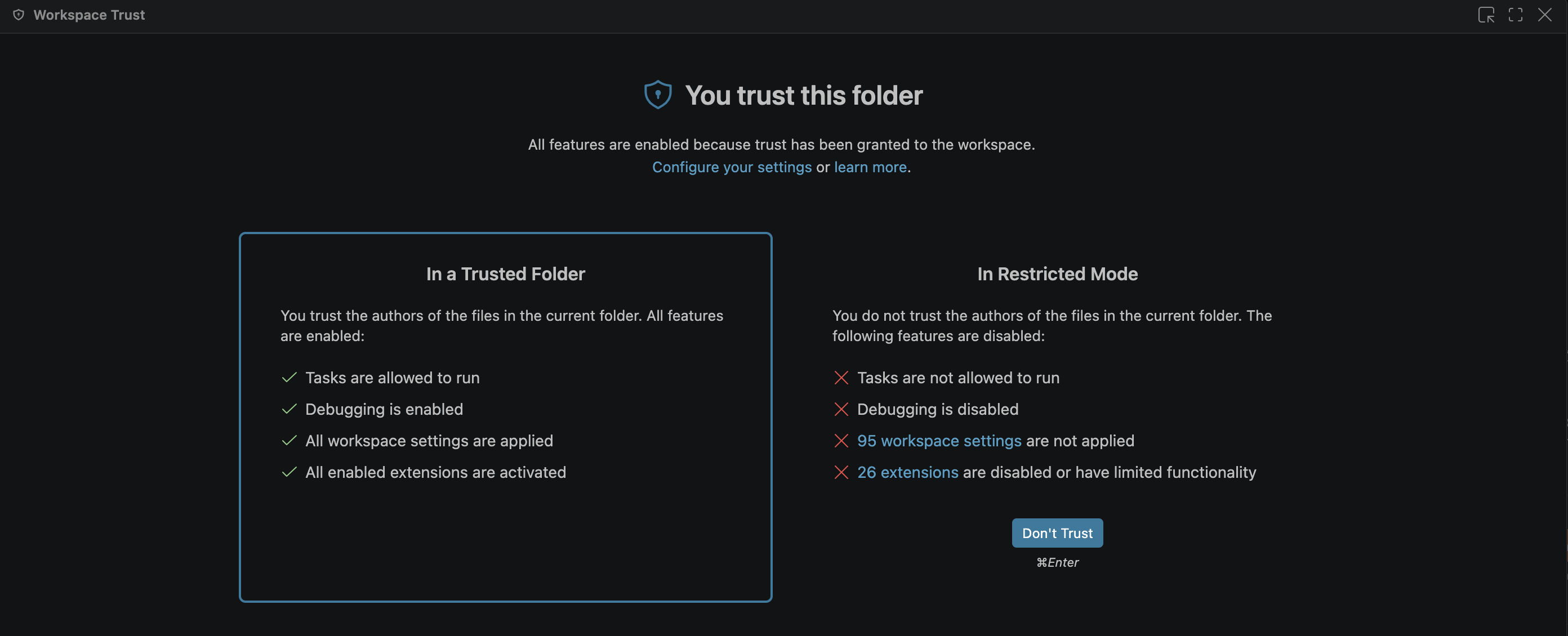
- Trust this folder by clicking on the "Restricted mode" button on the bottom left of VS Code.

- Once the Workspace Trust window appears, click Trust, and close the window.
Set up uv Project
- Click Terminal > New Terminal to open a terminal within the VS Code environment.
- Start a new uv project by running
uv init --bare- Now add some necessary packages by running
uv add jupyter ipykernel(this also installs Python)Open Jupyter Notebook file
Once your folder is chosen, click File > New File > Jupyter Notebook.
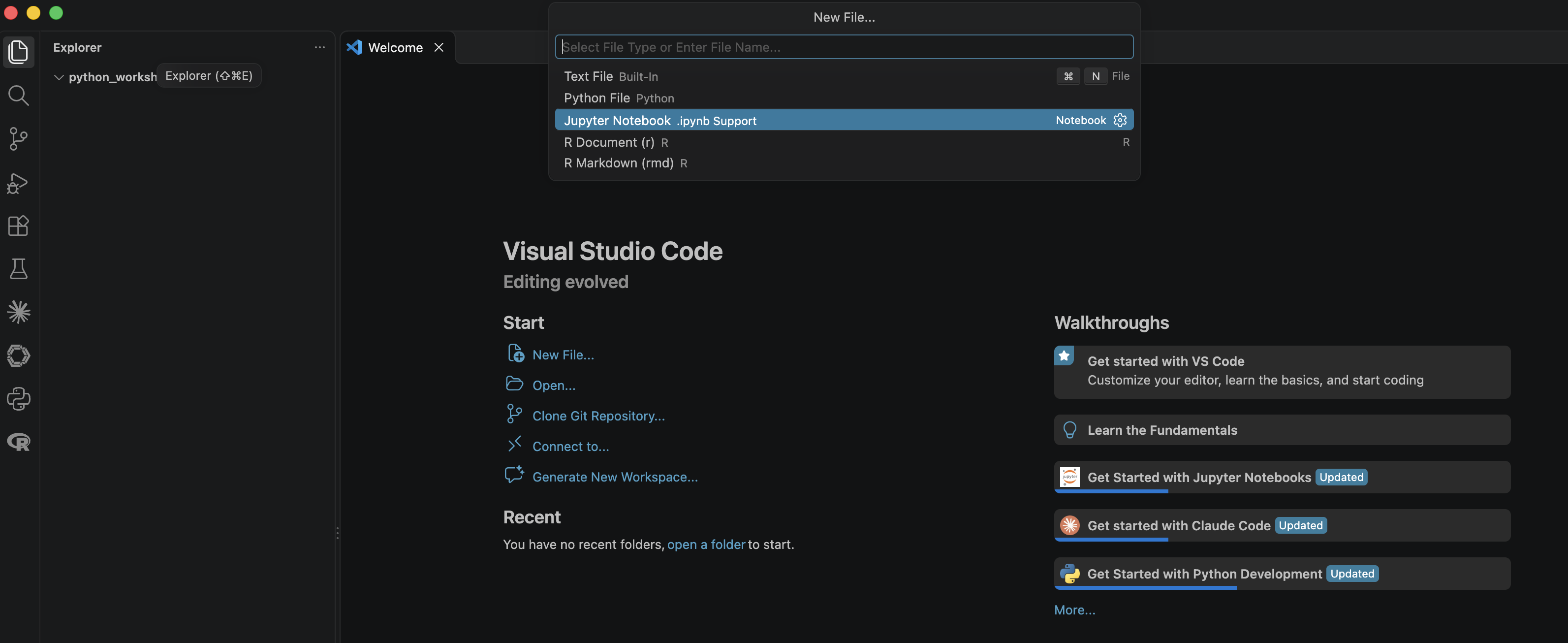
- Click Select Kernel > Python Environments > python-workshop (3.14.x)
- The kernel name might not show up but the path to the kernel should read
.venv/bin/python(Mac) or.venv/Scripts/python.exe(PC)
You're ready!
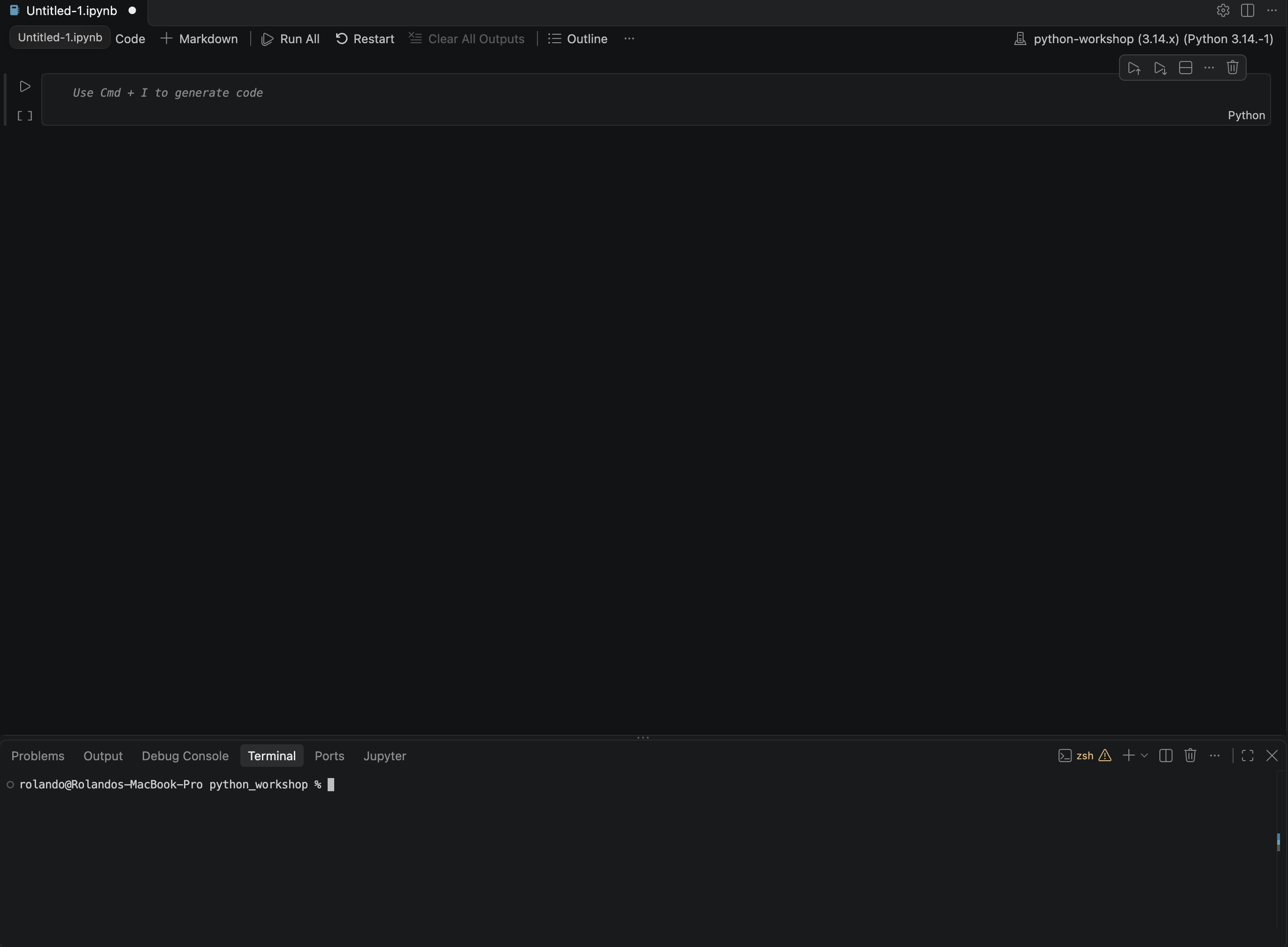
You should have two panes:
The Jupyter Notbeook pane (top) is a scripting window for writing modular Python code for reuse or sharing later.
The Terminal pane (bottom) contains a console for running terminal commands like installing additional packages.
Note: Code prepared in a simple text editor (not a formatted editor like Microsoft Word) can be executed (run) using your computer's command line or terminal.
Entering code
We'll begin by using Python as a simple calculator. The objective here is to introduce you how the panes in JupyterLab can work together and some basic Python syntax.
In this workshop, Python code will be presented in numbered grey cells as below. Any output generated will also be displayed below the grey cell.
2+2
4
5/0
---------------------------------------------------------------------------
ZeroDivisionError                         Traceback (most recent call last)
Cell In[3], line 1
----> 1 5/0

ZeroDivisionError: division by zero
Data Types and Variables
Ultimately, we need Python to store various values and objects for future re-use. Python has many default data types available. We will focus on a few common examples.
Strings and Numbers
We assign a value to a variable using =. We do not need to declare a type or give any other information.
number = 42

text = "Hello, World"
String objects, like text above, contain textual values. These are identified to Python by quotes; you can use either ' or " as long as you use the same type to begin and end your string.
Python uses several different numeric data types for storing different values. Examples include integers, long integers, and floating point numbers (decimals). Numbers can also be stored in string values using quotes.
For example:
notnumber = "42"
Once we have defined an object, we can use it again, most simply by printing it.
print(text)
Hello, World
print textIn Python 3, you must include parentheses:
print(text)We can also modify the contents of objects in various ways such as redefining them or changing their type. In some cases this is crucial to how Python can work with them. For example:
print(number + 58)
100
print(number + notnumber)
---------------------------------------------------------------------------
TypeError                                 Traceback (most recent call last)
Cell In[8], line 1
----> 1 print(number + notnumber)

TypeError: unsupported operand type(s) for +: 'int' and 'str'
This is the same as if we tried to add "cat" to the number 7!
print(7 + "cat")
---------------------------------------------------------------------------
TypeError                                 Traceback (most recent call last)
Cell In[9], line 1
----> 1 print(7 + "cat")

TypeError: unsupported operand type(s) for +: 'int' and 'str'
So we can add a value, 58, to our number object, but we can't add our notnumber object. Let's double check what notnumber contains:
print(notnumber)
print(number)
42
42
Even those these appear the same to our eye, Python uses them very differently. Remember how we defined notnumber? Let's check what data type Python is using with type.
type(notnumber)
str
Fortunately Python provides a set of functions to convert objects between different data types. A function packages a set of prewritten commands to accomplish a particular task. Most functions take one or more objects as inputs or 'arguments' and produce some new object as output.
The int function takes an object as an argument and converts it to an int (integer) numeric object. The usage is as follows:
newnumber = int(notnumber)
print(newnumber)
type(newnumber)
42
int
Now we can try adding objects again.
print(number+newnumber)
84
int objects can only hold integer values. If you have decimal values, use the float (floating decimal) type instead.
myfloat = float(newnumber)+0.5
print(myfloat)
42.5
Getting help with functions
You can access documentation for functions in Python with help, for example help(sum). Base Python functions and those provided by packages also usually have online documentation that may be easier to read.
Lists
Python's lists store multiple objects in a sequence. All of the data types we have seen so far (and indeed most data types in Python) can be placed in a list together (including other lists). For example, we can save numbers and character strings together:
my_list = [1, 2, 3, "four"]
print(my_list)
[1, 2, 3, 'four']
We can also define lists using previously defined objects (including other lists!):
obj0 = 12
obj1 = "cat"
obj2 = ["a", "b", "c"]
my_list1 = [obj0, obj1, obj2]
print(my_list1)
[12, 'cat', ['a', 'b', 'c']]
Once we've defined a list, we can add more elements to it with the .append function.
my_list1.append("dog")
print(my_list1)
[12, 'cat', ['a', 'b', 'c'], 'dog']
Indexing
Python retains the order of elements in our list and uses that order to retrieve objects in lists. These numbered positions are called indices.
We use [ and ] to provide indices in Python.
Most importantly, Python starts counting at zero: The first element in your list is denoted [0], the second [1], the third [2] and so on. This can take some getting used to!
my_list2 = ["cat", "dog", "parrot"]
print(my_list2[0])
print(my_list2[1])
print(my_list2[2])
print(my_list2[3]) #there's nothing here!
cat
dog
parrot
---------------------------------------------------------------------------
IndexError                                Traceback (most recent call last)
Cell In[18], line 5
      1 my_list2 = ["cat", "dog", "parrot"]
      2 print(my_list2[0])
      3 print(my_list2[1])
      4 print(my_list2[2])
----> 5 print(my_list2[3]) #there's nothing here!

IndexError: list index out of range
Comments:
Anything typed after a # in your code will be ignored and not executed by Python!
They don't need to follow any special formats or Python syntax after the #.
These are called "comments" and they allow you to organize and add notes to your code to better understand what's going on.
We can extract multiple adjacent items from a list using a colon.
[n:m] retrieves the values from index n to index m-1.
my_list1[0:2]
[12, 'cat']
The len function provides the length of an object in Python.
print(len(my_list1))
4
If len(my_new_list)=10 that means there are ten elements in the list. Remember that Python starts counting at 0, so the indices are 0 through 9.
Note: When we're experimenting with indices, the console provides a useful shortcut. Click the active line on the console and use the up arrow to move through the code you've previously executed in the console.
For example:
We might want to bring back the line of code above, my_list1[0:2] and modify it to my_list[0:1] to see how that affects the output.
This shortcut can save time typing or copying code you want to experiment with. Remember that whatever code you settle on probably belongs in your script if later code will depend on it!
Extra: Indexing beyond lists
Indexes can also be used with any sequential data type, including strings.
For example:
my_str = "The quick brown fox jumps over the lazy dog."
print(my_str[4])
print(my_str[4:9]) #4:9 indicates characters 4-8
q
quick
Using : ranges with one end blank will automatically go to the end of the object.
We can also work from right to left using negative numbers.
print(my_str[-4:])
print(my_str[:4])
dog.
The
We can still use multiple indices across sequential data types. For instance, a list of strings:
["home", "away"][0][0:3]
'hom'
It can be helpful to unpack nested indices, for example, let's look at what the first index [0] alone gives us:
["home", "away"][0]
'home'
Unfortunately, not all data types are sequential - indices will not work on numeric values, unless we convert them to strings with str. Python considers numbers to be a single "value" whereas the strings and lists both have natural component parts.
Dictionaries
Dictionaries are a useful alternative format for some types of information. Instead of an index, they used named "keys" to organized data. Dictionaries also benefit from faster performance than lists in most cases, due to their use of hash tables.
A dictionary is defined as follows:
class_dict = {"course":"Python II", "location":"Davis Library", "time":"4pm"}
type(class_dict)
dict
In this case, "course", "location", and "time" serve as the "keys" for this dictionary. Keys play a similar role to the indices we use for lists (or strings). We can print a particular value by placing its key in the same square brackets [] used by list indices.
print(class_dict["location"])
Davis Library
A numeric index will not work with dictionaries.
We can also generate a list of all of the keys for a dictionary using the .keys() method.
print(class_dict.keys())
dict_keys(['course', 'location', 'time'])
Review: Data Types
| Type | Example | Description |
|---|---|---|
int |
1, 2, 3 | Integers (whole numbers) |
float |
1.5, 2.72, 3.14 | Floating point numbers (decimals) |
str |
"cat", "dog", "car" | String, character, or text values |
list |
[1, 2, 3], ["cat", "dog"], [1, [2, 3]] | One or more objects indexed by order |
dict |
{"first_name":"John", "last_name":"Doe"} | One or more objects indexed by key values |
We will cover Python's dictionary (dict) and boolean (bool) types later on.
Read more about Python's built-in data types here.
There are many many more data types in Python packages for specific uses (e.g. datasets, images, sparse matrices).
Flow Control
Conditions and Booleans
Conditionals allow for more flexible instructions, letting our code react differently as our inputs change.
Conditions often arise from comparisons:
    <          strictly less than
    <= 	    less than or equal
    > 	     strictly greater than
    >= 	    greater than or equal
    == 	    equal
    != 	    not equal
    is 	    object identity
    is not 	negated object identity
    in 	    sequence membership
    not in 	sequence non-membership
Note: = is used for assignment, whereas == checks if two objects are equal.
Each condition considered evaluates to a Boolean value - True or False. Booleans have their own data type: bool.
num=5
num<3
False
letter="a"
letter in ["a","b","c"]
True
Conditional Statements
A conditional statement allows your code to branch and behave differently based on these conditions.
A simple conditional statement takes the form:
if <condition>:
    <do something only if condition is true>
Your instructions can be as long as necessary, provided they remain indented. Indentation is very important in Python as it groups lines of code without using explict characters like { and } as in many other languages.
You can indent with spaces or tabs, but you must be consistent.
We can supply alternate steps if the condition is false with else, or even consider multiple conditions with elif (i.e. else if).
if <condition1>:
    <do something if condition1 is true>
elif <condition2>:
    <do a different thing if condition1 is false and condition2 is true>
else
    <do a third thing if neither condition is true>
num = 5
if num > 4:
    print("This number is greater than four")
This number is greater than four
Adding else lets us give instructions if our condition is False.
num = 3
if num > 4:
    print("This number is greater than than four")
else:
    print("This number is less than or equal to four")
This number is less than or equal to four
Finally, the elif command lets us split the possible values of num into more groups. You can have as many elif statements as you need to split up possible conditions.
num = 8
if num < 3:
    print("This number is less than three")
elif num < 10:
    print("This number is greater than or equal to three and less than ten")
else:
    print("This number is greater than or equal to ten")
This number is greater than or equal to three and less than ten
For Loops
A "for loop" allows us to apply the same steps to each element in a list or other iterable. In essence, loops let us automate tasks relative to some sequence that we might otherwise write like this:
sales = [5, 2, 7, 9, 3]
total_sales = 0
total_sales = total_sales + sales[0]
total_sales = total_sales + sales[1]
total_sales = total_sales + sales[2]
total_sales = total_sales + sales[3]
total_sales = total_sales + sales[4]
print(total_sales)
26
In the code above, we're essentially applying the same operation (cumulative summation) to each object in sales one by one. A loop will let us write this operation in a general way and apply it to each object in a list or sequence.
Loops take the form:
for <name> in <list>:
do something based on name
<name>is completely arbitrary, though i, j, k, and n are relatively common. Use something that makes sense to you (and others)!<list>is a pre-defined list or other iterable object.- Reminder: Indentation is very important in Python and must be used consistently across the loop(s) Only the code indented under the loop will be run in each iteration.
my_nums = list(range(6))
print(list(range(6)))
for n in my_nums:
    print(n)
[0, 1, 2, 3, 4, 5]
0
1
2
3
4
5
Extra: Nested Loops
We can also loop within loops. Indentation is key to control which blocks of code are executed within which loop.
#Nesting loops - indentation is key!
listOfWords = ["blue", "yellow", "red", "green"]
newList = [] #initialize an empty list

for color in listOfWords:
    numLetters = 0 #resets to zero each time the loop runs
    for letter in color:
        numLetters += 1
    temporaryList = [color, numLetters]
    newList.append(temporaryList)

print(newList)
[['blue', 4], ['yellow', 6], ['red', 3], ['green', 5]]
Notice that before the loop begins we create an empty list. This is a common stragegy to collect outputs from some or all of the loops iterations. This can generalize to numbers by defining a zero-valued variable before the loop and modifying it with each iteration.
How could we write the code above with fewer lines? Is there a simpler way to find the length of each word?
For Loops with Conditionals
Loops become even more useful when combined with conditionals, to perform different steps based on conditions that change with each iteration of the loop.
for number in range(10):
    if number % 2 == 0:
    # % denotes the modulo operation - the result is the remainder after dividing by 2
    # (i.e. 6%2 = 0, but 5%2 = 1)
        print(number)
0
2
4
6
8
Recall that we can combine multiple conditions with and.
scores=[95, 90, 66, 83, 71, 78, 93, 81, 87, 81]
grades=[]
for score in scores:
    if score >= 90:
        grade = "A"
    elif score >= 80:
        grade = "B"
    elif score >= 70 and score < 80:
        grade = "C"
    elif score >= 60 and score < 70:
        grade = "D"
    else:
        grade = "F"
    grades.append([score, grade])
print(grades)
[[95, 'A'], [90, 'A'], [66, 'D'], [83, 'B'], [71, 'C'], [78, 'C'], [93, 'A'], [81, 'B'], [87, 'B'], [81, 'B']]
Comprehensions
Python provides some shortcuts to generating lists and dictionaries, especially those that you might (now) generate with a list. For example, let's generate a list of the square of each number from 1 to 15.
squares=[]
for n in range(1, 16):
    squares.append(n**2)
print(squares)
[1, 4, 9, 16, 25, 36, 49, 64, 81, 100, 121, 144, 169, 196, 225]
Using a "comprehension", we can shorten this to a single line, effectively bringing the loop inside the [] used to define the list.
squares=[x**2 for x in range(1, 16)]
print(squares)
[1, 4, 9, 16, 25, 36, 49, 64, 81, 100, 121, 144, 169, 196, 225]
The same general format holds for defining dictionaries.
squaresdict={k:k**2 for k in range(1, 16)}
print(squaresdict)
{1: 1, 2: 4, 3: 9, 4: 16, 5: 25, 6: 36, 7: 49, 8: 64, 9: 81, 10: 100, 11: 121, 12: 144, 13: 169, 14: 196, 15: 225}
We can include conditional statements at the end of the comprehension to build more flexible comprehensions.
sentence="the quick brown fox jumped over the lazy dog"
sentence=sentence.split(" ") #splits the string into a list with each space
print(sentence)
print([w for w in sentence if len(w)>4])
['the', 'quick', 'brown', 'fox', 'jumped', 'over', 'the', 'lazy', 'dog']
['quick', 'brown', 'jumped']
Review
So far, we've introduced:
- Numeric types (
int,float):
my_int = 4
- Strings (
str):
my_string = "cat"
- Lists (
list):
my_list = [my_int, my_string]
- Dictionaries (
dict):
my_dict = {'course': 'Python', 'duration': 2}
- For loops:
for k in range(10):
    print(k)
- Conditionals
if my_string == "cat":
    print("This is a cat!")
else:
    print("This is not a cat!")
random_words=["statement", "toy", "cars", "shoes", "ear", "busy",
              "magnificent", "brainy", "healthy", "narrow", "join",
              "decay", "dashing", "river", "gather", "stop", "satisfying",
              "holistic", "reply", "steady", "event", "house", "amused",
              "soak", "increase"]

vowels=["a", "e", "i", "o", "u", "y"]

output=[]

for word in random_words:
    count = 0
    for char in word:
        if char in vowels:
            count = count + 1
    if count >= 3:
        output.append([word, count])
#1. Get or define the list my_numbers
my_numbers=list(range(100))

#2. Create an empty list for the new all-odd numbers, called my_numbers2.

#3. Use a loop to iterate through the list of numbers

    #3a. For a given number check to see if it is even.

    #3b. If the number is even, add 1.

    #3c. Append the resulting number to the my_numbers2 list.
user_ages=["34", "27", "54", "19", "giraffe", "15", "83", "61", "43", "91", "sixteen"]
It would be useful to convert these values to a numeric type to get the average age of our users, but we want to build something that can set non-numeric values aside. We can attempt to convert to numeric and give Python instructions for errors with a try-except statement:
ages = []
problems = []

for age in user_ages:
    try:
        a = int(age)
        ages.append(a)
    except:
        problems.append(age)

print(ages)
print(problems)
[34, 27, 54, 19, 15, 83, 61, 43, 91]
['giraffe', 'sixteen']
def mean(number_list):
    s = sum(number_list)
    n = len(number_list)
    m = s/n
    return m

numbers=list(range(1, 51))
print(mean(numbers))
25.5